
PICK YOUR AI THEME TO GET STARTED

POSTCODES
Postcodes lets your shop deliver only to the areas you list.
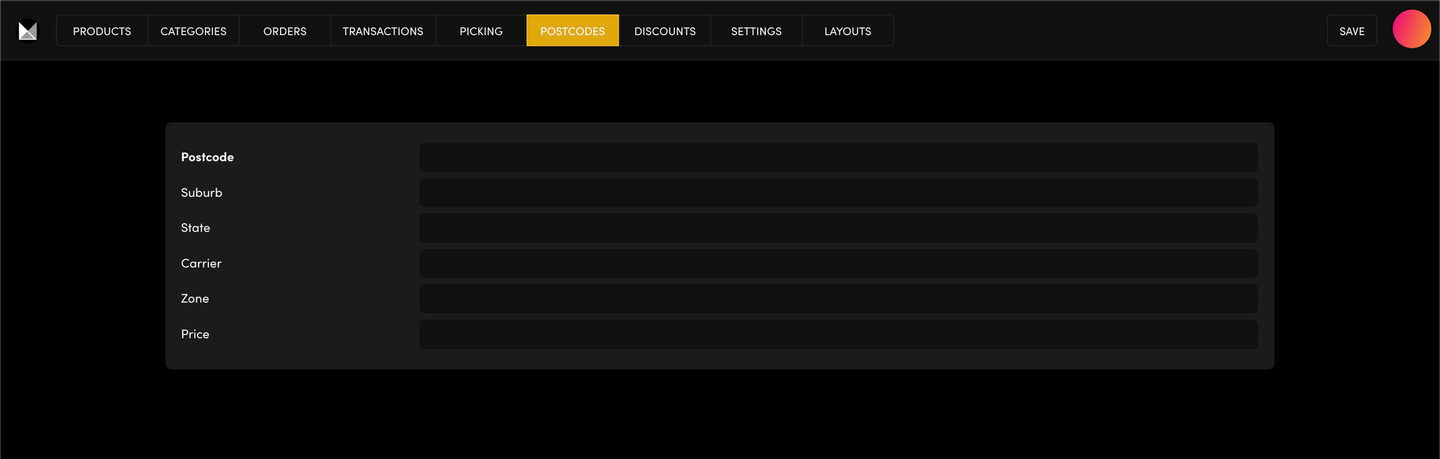
ADD A POSTCODE
Go to Ecommerce → POSTCODES and click ADD POSTCODE. Fill in the Postcode, Suburb, State, Carrier, Zone and Price, then click SAVE. Add one row for each suburb.
THE MESSAGES BUYERS SEE
In Ecommerce → SETTINGS → NOTIFICATIONS, set the Valid Postcode Message and the Invalid Postcode Message. That's what a buyer reads when their postcode is, or isn't, on your list.
"WE DON'T GO TO YOUR SUBURB"
If a buyer sees your invalid message, search for their suburb in your Postcodes list. It's missing or spelt differently: add or fix the row.
TEST IT
Add a product to the cart on your website, enter a postcode and check the message.
RELATED HELP
Play before you Pay?
GETTING AROUND
SUPPORT
AI SALES LINE
AI SUPPORT LINE
ENQUIRIES
team@moble.com.au
GET A QUOTE
A Web Builder for Design. A CMS for Business. We serve all businesses from SME's to Enterprise. Talk with us for AI development, custom website design, website development, ecommerce websites, directories, intranets and social networks.
PRIVACY | WEBSITE TERMS | PLATFORM TERMS | © 2026 MOBLE PTY LTD