
PICK YOUR AI THEME TO GET STARTED

DISCOUNT CODES
Only the codes on your Discounts list work at checkout.
CREATE A CODE
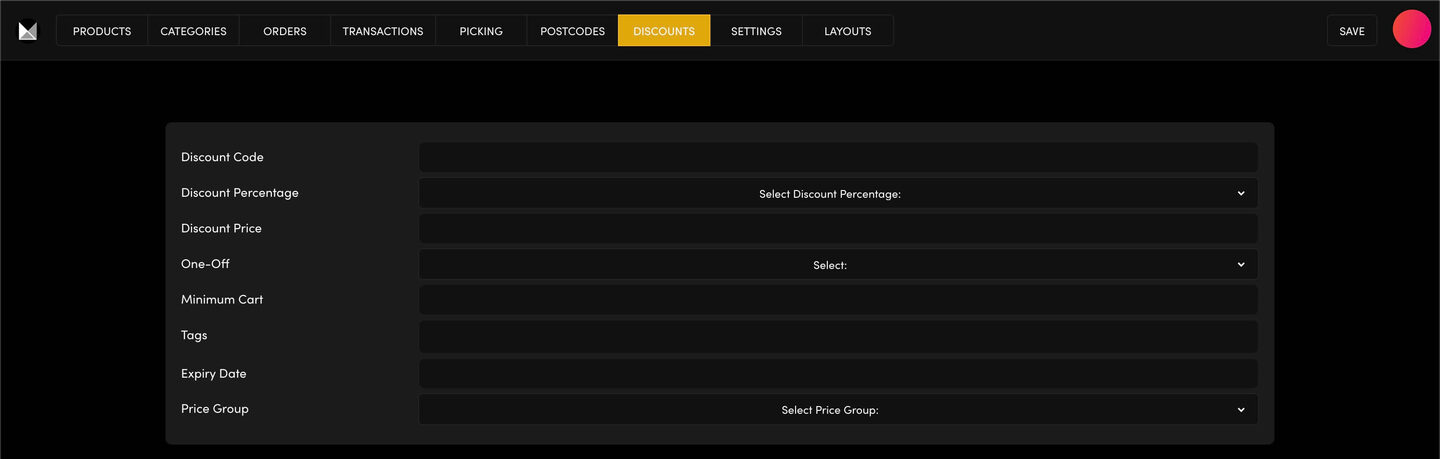
Go to Ecommerce → DISCOUNTS and click ADD DISCOUNT. Then fill in:
- Discount Code — what buyers type at checkout.
- Discount Percentage or Discount Price — a percentage or a fixed amount off.
- One-Off — for a code that can only be used once.
- Minimum Cart — the smallest cart the code works on.
- Tags — the product tags the code applies to.
- Expiry Date — when the code stops working.
- Price Group — the price group the code is for.
Click SAVE. The code works straight away.
MY CODE ISN'T WORKING
Check that it's spelt exactly as on your list, that the Expiry Date hasn't passed, that a One-Off code hasn't been used, that the cart is over the Minimum Cart, and that the products carry the code's Tags.
THE DEMO CODE
SHOP10OFF (10% off) is the demo code we use in training. If it's on your list and you don't use it, delete it with the bin on its row.
FREE SHIPPING
Free shipping over an amount isn't a discount code. Set it in Ecommerce → SETTINGS → FLAT SHIPPING → Free Shipping Over.
RELATED HELP
Play before you Pay?
GETTING AROUND
SUPPORT
AI SALES LINE
AI SUPPORT LINE
ENQUIRIES
team@moble.com.au
GET A QUOTE
A Web Builder for Design. A CMS for Business. We serve all businesses from SME's to Enterprise. Talk with us for AI development, custom website design, website development, ecommerce websites, directories, intranets and social networks.
PRIVACY | WEBSITE TERMS | PLATFORM TERMS | © 2026 MOBLE PTY LTD