
PICK YOUR AI THEME TO GET STARTED

ON HOVER
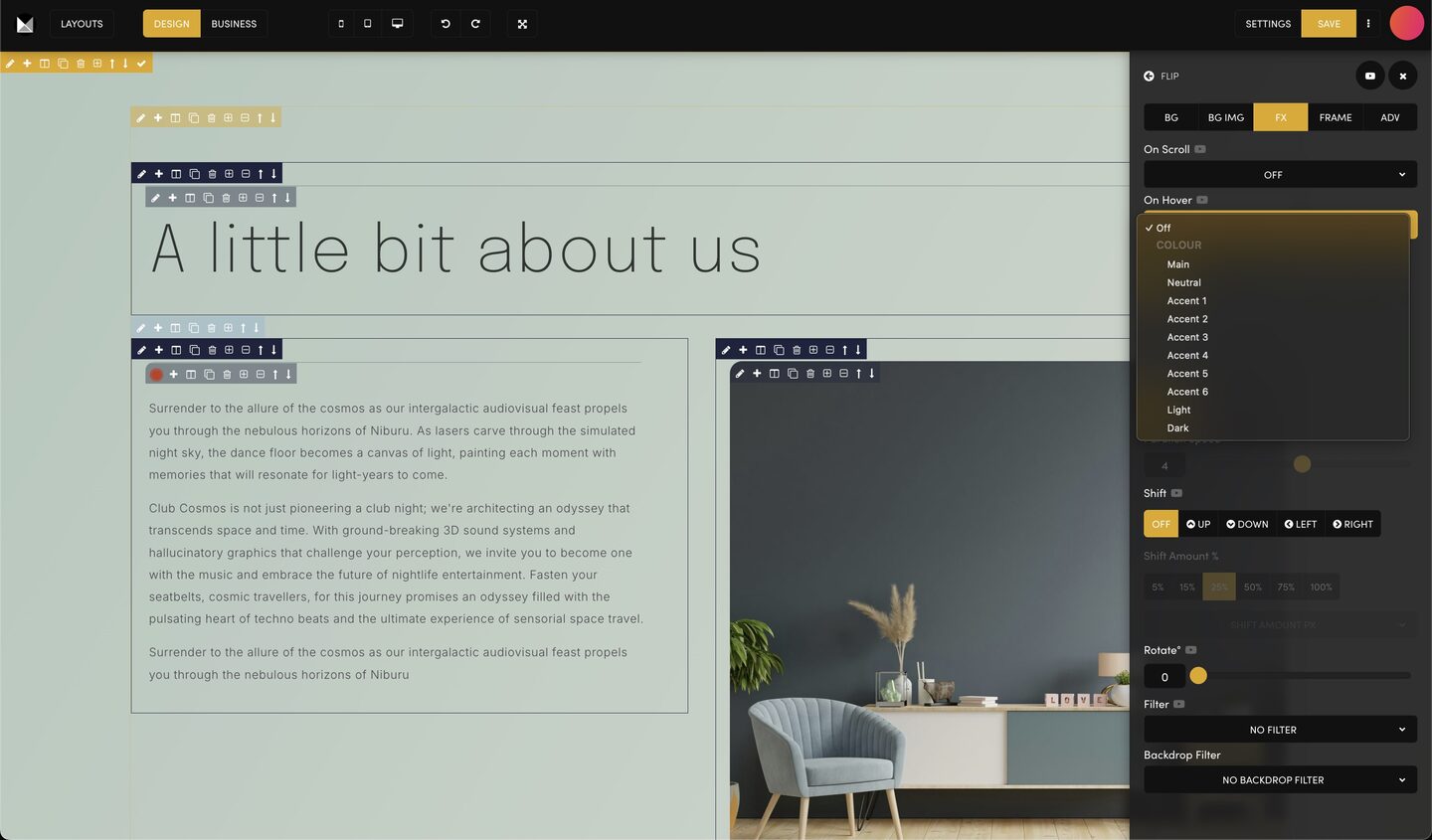
'On Hover' in the FX tab gives a frame one of your site colours while the pointer is over it.
In DESIGN mode, click the pencil on the frame to open the Tools Drawer, then the FX tab.
Open On Hover and choose a colour: Main, Neutral, Accent 1 to 6, Light or Dark. Choose Off to remove it.
Press SAVE in the editor and refresh your page, then move the pointer over the section. Phones and tablets have no hover, so the section must read well without it.
Use hover colour on a few cards or buttons rather than on every section.
RELATED HELP
Play before you Pay?
GETTING AROUND
SUPPORT
AI SALES LINE
AI SUPPORT LINE
ENQUIRIES
team@moble.com.au
GET A QUOTE
A Web Builder for Design. A CMS for Business. We serve all businesses from SME's to Enterprise. Talk with us for AI development, custom website design, website development, ecommerce websites, directories, intranets and social networks.
PRIVACY | WEBSITE TERMS | PLATFORM TERMS | © 2026 MOBLE PTY LTD